Navigating the New Site FAQ
Here's a "quick" rundown of some of the frequently asked questions we've been getting with regards to navigating the site.
Q) Where are the links to all the different sections on TFN?
They're in the "Site Navigation" drop down menu, located at the top left of every page on TFN (just below the banner).
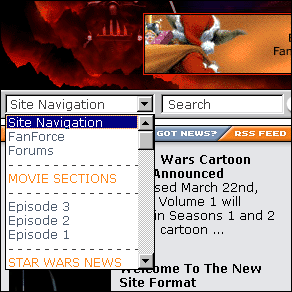
You can also see this drop down menu as a page by clicking on "
Explore TF.N" in the Site Navigation drop down menu,
or ...
by clicking on the "More TF.N" button in the left hand column of the Latest News section.

Q) Where can I see all of the news in one list like it used to be?
In the Latest News section.
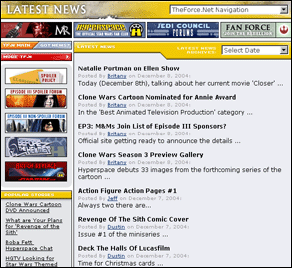
You can also see a listing of all the news under each
article.
Q) Where's the link for Latest News then? I can't find it.
In the Latest News Box on the frontpage, there's a yellow bar at the bottom that says "More News".
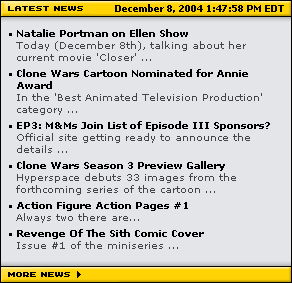
It's also listed in the Site Navigation drop down menu.
Q) Do you have a RSS Feed? I can't find a link for it.
In the top left box on the frontpage (where the Top Stories are listed), there's an orange RSS button at the end of the row.
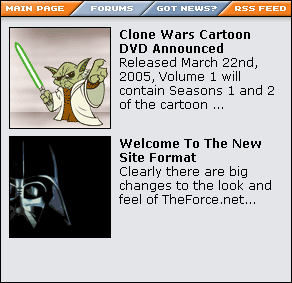
It's also listed in the Site Navigation drop down menu.
Q) When I'm in [Insert Section Here], where are the links to the rest of the section's content?
You can use the section's drop down menu,

or ...
you can use the "more" buttons in the left hand column of the section's page.












![[Previous Page]](/images/local/leftnav_prev_off.gif)
![[TF.N - More]](/images/local/leftnav_more_off.gif)

![[TFN FanFilms Now On YouTube.com]](http://www.theforce.net/fanfilms/images/fanfilm-youtube.jpg)

![[Popular Stories]](/images/subpage/sub_popstories_top.gif)

![[Jedi Council Forums]](/images/subpage/sub_jcforums_top.gif)

![[TF.N Poll]](/images/subpage/sub_poll_top.gif)


![[All Posters]](/images/global/rightnav_allposters_hdr.gif)

![[Rebelscum.com - Star Wars Collecting]](/images/ads/btn-med-rebelscum2.gif)
![[TheForce.Net - FanFilms]](/images/ads/btn-med-fanfilms2.gif)
![[TheForce.Net - FanForce]](/images/ads/btn-sml-fanforce.gif)
![[TheForce.Net - Fan Art]](/images/ads/btn-sml-fanart.gif)